
Turn a logo into an embroidery file in seconds
Upload a logo or type text. StitchGen digitizes it into DST and PES files, with a stitch preview, the thread colour order and a production sheet for the operator.
Drop your logo here
or click to choose · SVG, PDF, AI, PNG, JPG · up to 4 MB
No file handy? ·
Machine files
DST runs on Tajima, Barudan, SWF, ZSK and most industrial machines. PES for Brother, JEF for Janome.
Your result appears here
A stitchability score, a stitch simulation, the thread colour order, a production sheet and machine files to download.
Free tool: files up to 4 MB, one design at a time. Always stitch a test piece on the real fabric before running a batch.
From artwork to stitches
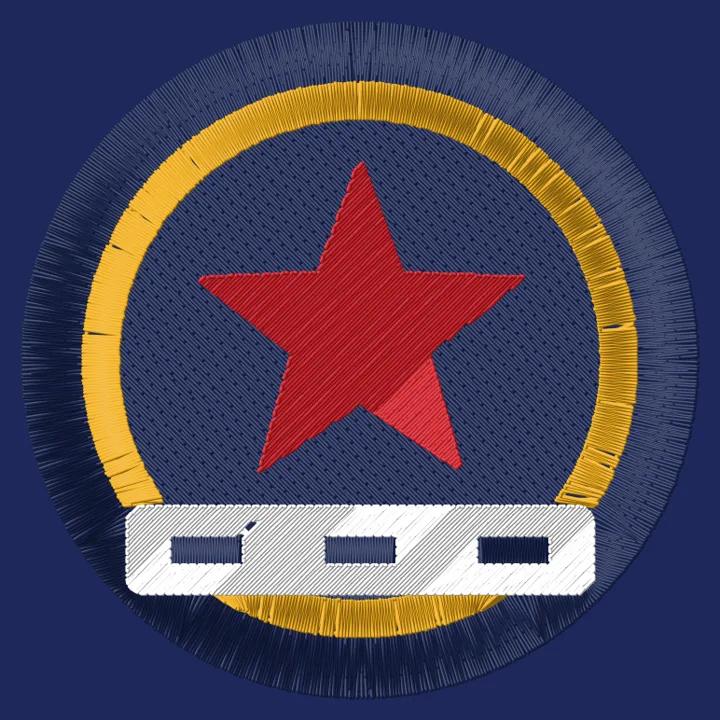
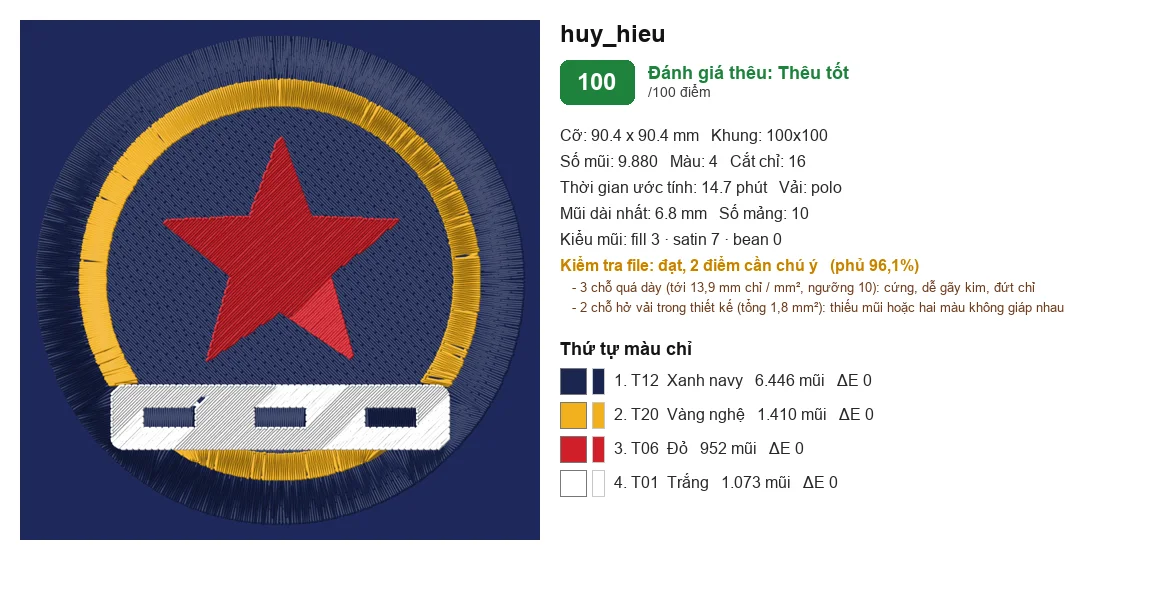
A 4-colour badge, 90 mm wide on a polo shirt: 9,880 stitches, about 15 minutes of machine time, file check passed.

What StitchGen does
- 1
Clean up and separate colours
Removes white and fake checkerboard backgrounds, merges near-identical colours and matches each colour to the closest thread.
- 2
Choose stitch types
Thin strokes become satin or running stitch, large areas become fill, with underlay and pull compensation tuned to the fabric.
- 3
Order the run
Background colours first, outlines last, and hidden travel under areas stitched later to cut down on trims. Caps stitch centre-out, bottom-up.
- 4
Check and export
Flags stitches that are too dense or too long and gaps in coverage, scores stitchability, then exports machine files and a production sheet.
Enough for a real embroidery order
Files for every machine
DST for Tajima, Barudan, SWF, ZSK; PES for Brother; plus JEF, EXP and VP3. Download each file or the full zip.
Score before you stitch
Get a score and advice as soon as you pick a file: text too small, strokes too thin, too many colours, minimum size to stitch.
Standard placements
Left chest, centre chest, back, baseball cap front, bucket hat: the design is fitted to the area, with a warning above the stitch limit.
3D puff embroidery
Separates parts wide enough to stitch over foam, stitches thin parts flat first, and marks the foam stop on the production sheet.
Text with accents
Type names or multi-line slogans, set cap height, thread colour and letter spacing; Vietnamese accents are stitched in full.
Production sheet
Stitch preview, thread colour order with thread codes, stitch count, machine run time and recommended hoop.
Frequently asked questions
Can StitchGen replace a human digitizer (punching)?
For clean logos with few colours and text that is not too small, StitchGen files stitch out as they are. Highly detailed logos, gradients, photos or text under 5 mm still benefit from manual digitizing. The score and the notes tell you which group your design falls into.
Which file type should I upload?
SVG, PDF or AI give the sharpest result because they are vector files. PNG and JPG also work, ideally with a transparent or white background and enough resolution. The free tool accepts files up to 4 MB.
Can I use the DST file directly on my machine?
Yes. DST is the common format for industrial embroidery machines. Every fabric and machine behaves a little differently, so stitch a test piece before running a batch.
Is my logo stored?
Your file is only used to create the embroidery file for that request. The digitizer does not keep it long term or use it for anything else.
I want my logo embroidered on shirts or caps. How do I order?
Send your logo to Startee through the form below, WhatsApp or Zalo. Startee checks the embroidery file, picks threads, makes a sample and delivers; the embroidery itself is done by partner workshops in Startee's network.
Need your logo embroidered?
Send your logo and Startee will check the embroidery file, pick the threads and send you a quote.
0943 903 866WhatsAppZaloNo. 1, Lane 96 Tan Xuan Street, Dong Ngac, Bac Tu Liem, Hanoi · cskh@startee.vn
Số 1, ngõ 96 Tân Xuân, Đông Ngạc, Bắc Từ Liêm, Hà Nội
Directions to the workshopCÔNG TY TNHH STARTEEX · MST 0111168054